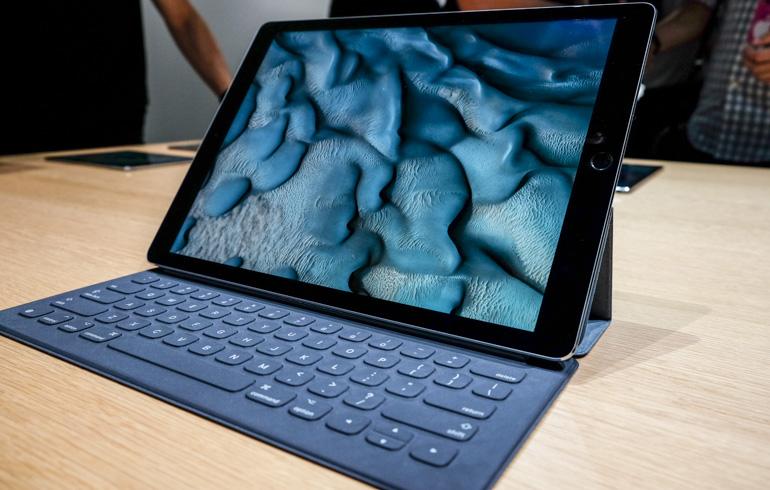
Can the iPad Pro replace your personal computer? Apple CEO Tim Cook thinks it can. He’s even boasted about his ability to travel sans a computer, using just his iPad Pro and iPhone for all computing needs.
Cook’s stance on replacing PCs with the iPad Pro might not be that far-fetched. Then again, it could be nothing more than Apple’s typical marketing machine kicking into full gear to create hype around the biggest iPad yet. Remember, iPad sales continue to decline and Apple is in need of a spark to reignite its tablet sales.
To put Cook’s claim to the test, I spent the last week using the iPad Pro as my only computer. I penned emails, worked in Excel spreadsheets, and edited photos. I jotted down notes with the Pencil, sent invoices from QuickBooks, and, of course, tapped out this very review on Apple’s Smart Keyboard.
At the end of the week it’s apparent there’s some truth in Cook’s statement. For a lot of people, the iPad Pro can very well be a computer replacement, but it’s not going to be for everyone.
Hardware
The iPad Pro is available in silver, gold, and space grey. Pricing starts at $799 for 32 GB of storage with Wi-Fi connectivity, with a 128 GB Wi-Fi model priced at $949. Adding a cellular connection to the super sized tablet is currently only possible with the 128 GB model, pushing the price up to $1,079.00. Those prices do not include Apple’s Keyboard or Pencil, priced at $169 and $99, respectively.
Its 12.9 inch screen is a modest increase from the 9.7 inch screen found on the now mid-sized iPad line. Apple (AAPL) calculates the size difference provides users with 78% more screen real estate than the iPad Air 2.
The iPad Pro’s weight is nearly identical to the first generation iPad, at 1.57 pounds. (For comparison, the iPad Air 2 weighs just under one pound.) I didn’t find the iPad Pro heavy when holding it for short periods of time. But it’s not something you’ll want to hold for long periods of time while reading a book or watching movies. It’s better suited for sitting on a desk or your lap.
Atop the iPad Pro you’ll find two speakers, a 3.5 mm headphone jack, and the power button. On the bottom you’ll find two more speakers, and a Lightning port for charging and transferring data to the device. The speakers are a marked improvement for the iPad line as whole. As you turn and rotate the device the speakers automatically adjust their respective audio responsibility, assigning mid and high frequencies to the top two speakers at any given time. I listened to a lot of music on the iPad Pro, and have zero complaints about them. They’re loud, and the sound quality is good; something that can’t be said of the iPad Air 2’s speaker. I hope Apple brings this technology to the rest of the iPad line.
On the left side of the housing are three circular dots that make up what Apple calls the “Smart Connector.” Through these, keyboard accessories such as Apple’s Smart Keyboard or Logitech’s Create keyboard connect to the iPad Pro.
The connector’s benefit is two-fold: First, it eliminates the Bluetooth connection between the keyboard and the iPad, removing the need to pair devices or troubleshoot the occasional connection issues. Second, the connector provides power to the keyboard, decreasing its overall size and weight while simultaneously removing the need to recharge your keyboard.
Performance
Apple has equipped it with its new A9X chip. According to Apple, its latest processor offers double the speed and graphics performance of the A8X chip found in the iPad Air 2.
I can’t verify precise speed improvement claims, but I can confirm the iPad Pro feels faster than my iPad Air 2. I most noticed the speed boost when waiting for Pixelmator to apply edits to photos, or as the iPad Pro resized applications in iOS 9’s split view mode.
Apple claims the iPad Pro’s battery is built to last 10 hours. Unfortunately, I never achieved this mark. With constant keyboard use, streaming music, two apps open at all times, and frequent switching between apps, the result was that the iPad Pro’s battery routinely ran out of juice around the seven-and-a-half hour mark.
On a few occasions I found the iPad Pro to be unresponsive after charging it overnight. I had to perform what’s called a “hard reset” (holding the power and home buttons in until you see the Apple logo appear) in order to get it working again. When I asked Apple about the issue, I was given the link to a support document instructing users to hard reset an unresponsive device. It appears the issue is software related, and will hopefully be fixed in an upcoming software update.
Accessories
With the release of the iPad Pro, Apple also released a keyboard accessory and a stylus. Sorry, I mean Pencil.
Apple’s Smart Keyboard doubles as a protective case for the screen when not in use, similar to the Smart Covers Apple has for other iPad models. As previously mentioned, the Smart Keyboard uses Apple’s new Smart Connector tech to communicate with the iPad Pro. I really enjoyed typing on Apple’s new keyboard. The keys are of ample size and spacing, and offer just the right amount of travel. It offers a similar typing experience to Apple’s new MacBook or the Magic Keyboard. Plus the keyboard is easy to remove, attaching to the iPad Pro through magnets, should I want to ditch the keyboard altogether.
I also tested Logitech’s $149 Create keyboard for iPad Pro during my review, the only other keyboard currently available that works with the Smart Connector. The Logitech keyboard completely covers the iPad Pro, making it a more permanent solution. The top row of keys serve as shortcut keys for common iOS commands, such as increasing or decreasing volume, or lock key to quickly lock the iPad.
I had no issues using either keyboard on a desk, or in my lap while sitting on a couch. My personal preference leans towards Apple’s keyboard, but you can’t really go wrong with either one should you have an iPad Pro and want a keyboard.
With that said, both keyboards would benefit from the ability to adjust viewing angles of the iPad Pro’s screen when in use. As it is now you only get one viewing angle on either product, which can be a problem when typing at standing desk or placing the keyboard on your lap.
My artistic capabilities provide just enough skill to draw some amazing stick figures, and little more. So instead of using the Pencil as a tool for sketching, I used it to take handwritten notes. It’s the same way I put the Surface Pro 3 Pen to the test last year.
There’s no other way to say it: The Pencil is by far the best stylus I’ve used. The ink immediately displays on the iPad Pro’s screen as you move across the display, with no perceivable delay or lag. Writing with competing devices often results in worse handwriting, thanks to a slight offset from where the tip of the stylus is, and where the digital ink ends up. With the Apple Pencil, where the tip is, so is your ink.
You can charge the Pencil by removing its cap and plugging it directly into the Lightning port on the iPad Pro. It took roughly 30 minutes and 10% of the iPad Pro’s battery to charge the Pencil from zero battery to 100%.
Software
iOS 9 on the iPad Pro offers the same tools and features I talked about in my review of iOS 9’s iPad specific features, only on a larger screen. And the added screen makes all the difference.
Instead of having to constantly swipe within an app to view more cells in a spreadsheet, or read an entire email when using split view, the iPad Pro’s larger screen displays more information. In turn, you’re able to work more efficiently.
Perhaps the biggest software improvement is the added support for keyboard shortcuts with physical keyboards. On any screen, you can hold in the command key for a few seconds to view a list of keyboard shortcuts supported by the respective app. In Mail, command-shift-d sends a message. In Safari, command-T opens a new tab. Keyboard shortcuts make it easier to navigate the touch interface without having to actually touch your screen.
There’s still plenty of room for improvement on the software front. Despite allowing two apps to run at the same time, there’s no way to view two Safari tabs at the same time.
The single instance where I had to use a Mac during my week was due to Safari’s lack of a download tool. I was attempting to download around 500 MB of photos using Safari on the iPad Pro, with no luck. After repeated attempts, I gave up and opened my MacBook and downloaded the files in just a few seconds.
Last but not least, the iPad Pro’s home screen uses the same app icon grid as every other iOS device. This app grid works well on iPhone, and maybe even iPad Mini, but it’s time to rethink the home screen on iPad Pro. There’s simply too much wasted space in its current from.
In closing
Just over three years ago, I used the third-generation iPad and a Bluetooth keyboard as a writing device. I much preferred how iOS forced me to concentrate on one task at a time, instead of bouncing between multiple browser tabs, a Twitter app, and email client on a Mac. I wrote almost exclusively on the iPad, relying on my Mac for more intense computing needs.
With the iPad Pro and iOS 9, I still had the benefit of being forced to focus on the task at hand, but I no longer had to use my Mac. This is as much a testament to the iPad Pro as it is to the advancements Apple has made with iOS.
One hurdle Apple will need to overcome in its bid to sell more iPads is the perception that the iPad Pro can’t do all of the same things a computer can.
The truth is, leveraging the ever-growing third-party app ecosystem, the iPad Pro can do almost everything a computer can.
With that said, using an iPad Pro as a full-fledged computer requires a lot of time and research to get it to a point where you feel comfortable with it being a laptop replacement. Most people aren’t willing to put in that work, and understandably so. Why would you when there’s a perfectly capable computer sitting on your desk?
Be sure to watch a video of Apple CEO Tim Cook announcing iPad Pro below: