• Home
  • Latest
  • Fortune 500
  • Finance
  • Tech
  • Leadership
  • Lifestyle
  • Rankings
  • Multimedia

Trendingnow

1

Philanthropy leader at Warren Buffett and Bill Gates’ Giving Pledge says children of billionaires are pushing them to give their wealth away faster

2

'Skills nobody can take': Meet a 20-year-old with a 4.5 GPA who skipped college for technical school to land an 'AI-proof' career

3

Meet a 71-year-old who retired as a radiologist and professor, and now runs a banana-skewer business: ‘I never want to retire. Why would you do that?’

1

Philanthropy leader at Warren Buffett and Bill Gates’ Giving Pledge says children of billionaires are pushing them to give their wealth away faster

2

'Skills nobody can take': Meet a 20-year-old with a 4.5 GPA who skipped college for technical school to land an 'AI-proof' career

3

Meet a 71-year-old who retired as a radiologist and professor, and now runs a banana-skewer business: ‘I never want to retire. Why would you do that?’
TechApple

Apple TV: Two Big Fixes with One Software Update

By
Philip Elmer-DeWitt
Philip Elmer-DeWitt
Down Arrow Button Icon
By
Philip Elmer-DeWitt
Philip Elmer-DeWitt
Down Arrow Button Icon
December 8, 2015, 4:42 PM ET
Courtesy of Apple
Google source logo
Add Fortune on Google for similar content.

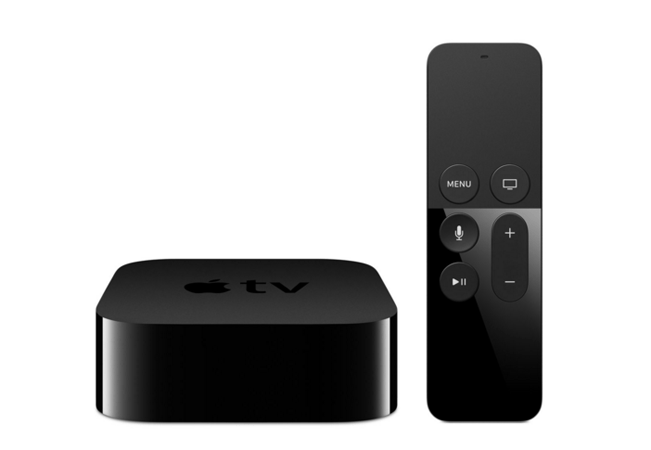
This fall, when Apple released the fourth edition of its Apple TV set-top box, two complaints quickly surfaced:

— The existing iPhone Apple Remote app, which worked with the old box, didn’t work with the new one.
— The Siri voice-activated search function that worked so well for music on the iPhone, didn’t work on Apple TV.

The effect of both issues was to force users to hunt and peck for letters on Apple TV’s clunky on-screen keyboard.

A software update released Tuesday—tvOS 9.1—addresses both those issues, along with some bug fixes and performance improvements.

To update your Apple TV, launch the Settings app on the TV’s opening screen, then select System > Software Update > Update Software > Download and Install.

Follow Philip Elmer-DeWitt on Twitter at @philiped. Read his Apple (AAPL) coverage at fortune.com/ped or subscribe via his RSS feed.

Be sure to sign up for Data Sheet, Fortune’s daily newsletter about the business of technology.

For more on Apple, check out the following Fortune video:

About the Author
By Philip Elmer-DeWitt
See full bioRight Arrow Button Icon

Latest in Tech


Most Popular

Fortune Secondary Logo
Rankings
  • 100 Best Companies
  • Fortune 500
  • Global 500
  • Fortune 500 Europe
  • Most Powerful Women
  • World's Most Admired Companies
  • See All Rankings
  • Lists Calendar
Sections
  • Finance
  • Fortune Crypto
  • Features
  • Leadership
  • Health
  • Commentary
  • Success
  • Retail
  • Mpw
  • Tech
  • Lifestyle
  • CEO Initiative
  • Asia
  • Politics
  • Conferences
  • Europe
  • Newsletters
  • Personal Finance
  • Environment
  • Magazine
  • Education
Customer Support
  • Frequently Asked Questions
  • Customer Service Portal
  • Privacy Policy
  • Terms Of Use
  • Single Issues For Purchase
  • International Print
Commercial Services
  • Advertising
  • Fortune Brand Studio
  • Fortune Analytics
  • Fortune Conferences
  • Business Development
  • Group Subscriptions
About Us
  • About Us
  • Press Center
  • Work At Fortune
  • Terms And Conditions
  • Site Map
  • About Us
  • Press Center
  • Work At Fortune
  • Terms And Conditions
  • Site Map
  • Facebook icon
  • Twitter icon
  • LinkedIn icon
  • Instagram icon
  • TikTok icon
  • YouTube icon

    Latest in Tech


    Most Popular

    © 2026 Fortune Media IP Limited. All Rights Reserved. Use of this site constitutes acceptance of our Terms of Use and Privacy Policy | CA Notice at Collection and Privacy Notice | Do Not Sell/Share My Personal Information
    FORTUNE is a trademark of Fortune Media IP Limited, registered in the U.S. and other countries. FORTUNE may receive compensation for some links to products and services on this website. Offers may be subject to change without notice.