• Home
  • Latest
  • Fortune 500
  • Finance
  • Tech
  • Leadership
  • Lifestyle
  • Rankings
  • Multimedia

Trendingnow

1

Pentagon accuses Alibaba, Baidu and BYD, three of China's biggest companies, of supporting the Chinese military

2

Analysts expected oil to surge above $200 but China has quietly kept prices half of that—and can’t for much longer

3

Costco CEO Ron Vachris rose from forklift driver to the C-suite without a college degree: ‘Don’t chase a title’ is the career advice that got him there

1

Pentagon accuses Alibaba, Baidu and BYD, three of China's biggest companies, of supporting the Chinese military

2

Analysts expected oil to surge above $200 but China has quietly kept prices half of that—and can’t for much longer

3

Costco CEO Ron Vachris rose from forklift driver to the C-suite without a college degree: ‘Don’t chase a title’ is the career advice that got him there
Logged In

Clear space on your iPhone or iPad to make room for an update

By
Jason Cipriani
Jason Cipriani
Down Arrow Button Icon
By
Jason Cipriani
Jason Cipriani
Down Arrow Button Icon
January 20, 2015, 11:00 AM ET
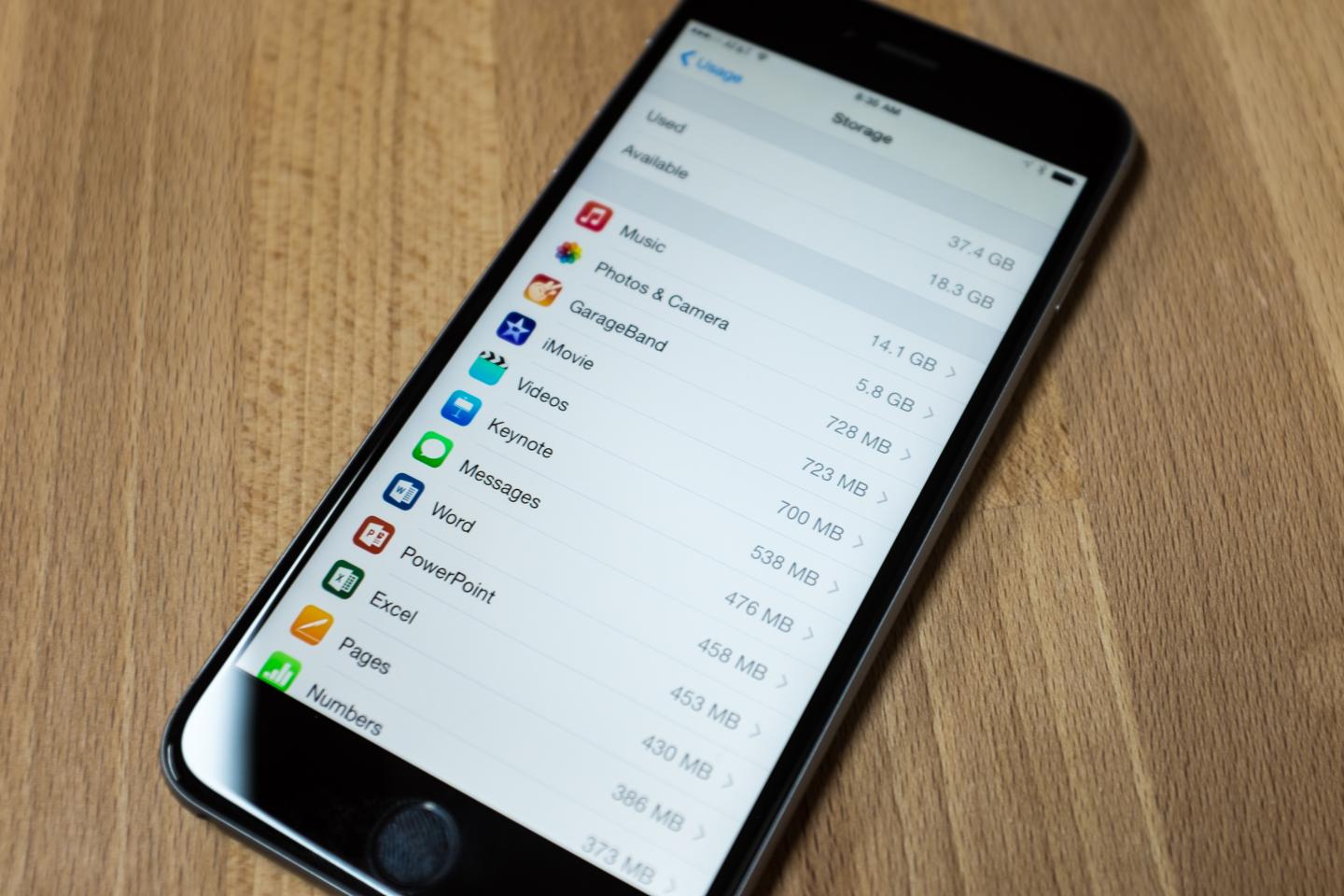
Jason Cipriani's iPhone storage
Jason Cipriani's iPhone storagePhotograph by Jason Cipriani

Q: My iPhone keeps alerting me of an available update, but I can’t update because I’m out of storage. What do I do?

A: Ah, yes. The annoying “This update cannot be installed because it requires at least 4.7 GB of storage” message. Adding to the frustration is the lack of instructions from Apple beyond a brief mention of deleting items from “Usage Settings,” whatever that is. My inbox was flooded with messages asking for help about this issue shortly after the September release of iOS 8.

An annoying issue, sure, but one that’s easy to remedy. I promise you won’t need to be a computer whiz to take care of it on your own.

To start, we need to identify what’s taking up space on your device. This bit of information can be found by follow these steps on your iOS device:

1.) Launch the Settings app. Select “General.”

2.) Find and select “Usage” from the options.

3.) If you’ve updated to iOS 8, you need to take an additional step: select “Manage Storage” in the Usage menu.

Here you’ll find out just how much free space your device has, and more importantly how much you need to clear. Just below the storage statistics at the top, a list of installed apps and associated files will begin to populate. The items taking up the most space will be at the top of the list.

Tap on an app and you’ll be presented with the option to delete it. (One exception: Apple’s core apps, such as Mail or Contacts.) It’s easy to forget just how many apps you have on your device, so take a few extra minutes to perform an audit.

Still need more room?

You probably noticed that the biggest culprit of your dwindling storage is likely the Photos app. It’s hardly a surprise. Apple has been pushing users to trust and depend on its iCloud for backing up the data on their devices. We are connecting our devices to computers far less frequently than we used to. Put those two trends together and we often forget to periodically remove photos and videos—or we assume it’s already being done for us.

Short of deleting your photos outright, the quickest method to clean up your Camera Roll is to sync it with your computer, offloading the photos to a less portable device and clearing space on the one in your pocket. On a Mac, you can use iPhoto or Image Capture. On Windows 7, you should see the AutoPlay prompt asking if you’d like to import your photos. Windows 8 users must launch the Photos app to transfer images.

Once you’ve verified all of your photos (and audio, video, e-books, et cetera) have indeed been offloaded to your computer, delete them from your iOS device.

With enough storage space cleared up, you can go back into Settings > General > Update Software and start the process over.

Lastly, if you’d prefer to clear less space on your iOS device before you update your system software, you can use iTunes to perform the update.

1.) Make sure the computer you’re using is running the latest version of iTunes.

2.) Connect your unlocked iOS device to the computer with a USB cable.

3.) If prompted, select Trust Device on both the computer and mobile device.

4.) Click Download and Update on the prompt alerting you to an available update.

Downloading the update can take anywhere from 10 to 30 minutes depending on the speed of your connection. After it’s downloaded, iTunes will begin the installation. Your device will power off a couple of times, the screen will flash, and a status bar will be show up. Sit back, relax, and wait for it to finish. Your computer will let you know when it’s time to disconnect your device.

Unfortunately, you’re likely to run into this issue all over again as Apple releases more system updates down the road—and as you continue to fill up your device with apps, photos, and the like. If you get the urge to kick the can down the road, don’t: it’s important to keep software current on your iOS device to zap software bugs and patch up security holes. (New features don’t hurt, either.)

With the Apple Watch on the horizon, you can bet your last dollar that Apple will issue a software update to accompany it—so it’s best to bite the bullet now. Wouldn’t it be frustrating to unbox Apple’s latest gadget only to wait an hour while you offload photos from last summer’s trip to the Bahamas?

“Logged In” is Fortune’s personal technology column, written by Jason Cipriani. Read it on Fortune.com each Tuesday.

About the Author
By Jason Cipriani
See full bioRight Arrow Button Icon

Latest in

Finance
Lorem ipsum dolor sit amet, consectetur adipiscing elit, sed do eiusmod tempor incididunt ut labore et dolore magna aliqua. Ut enim ad minim veniam
By Fortune Editors
October 20, 2025
Finance
Lorem ipsum dolor sit amet, consectetur adipiscing elit, sed do eiusmod tempor incididunt ut labore et dolore magna aliqua. Ut enim ad minim veniam
By Fortune Editors
October 20, 2025
Finance
Lorem ipsum dolor sit amet, consectetur adipiscing elit, sed do eiusmod tempor incididunt ut labore et dolore magna aliqua. Ut enim ad minim veniam
By Fortune Editors
October 20, 2025
Finance
Lorem ipsum dolor sit amet, consectetur adipiscing elit, sed do eiusmod tempor incididunt ut labore et dolore magna aliqua. Ut enim ad minim veniam
By Fortune Editors
October 20, 2025
Finance
Lorem ipsum dolor sit amet, consectetur adipiscing elit, sed do eiusmod tempor incididunt ut labore et dolore magna aliqua. Ut enim ad minim veniam
By Fortune Editors
October 20, 2025
Finance
Lorem ipsum dolor sit amet, consectetur adipiscing elit, sed do eiusmod tempor incididunt ut labore et dolore magna aliqua. Ut enim ad minim veniam
By Fortune Editors
October 20, 2025

Most Popular

Finance
Lorem ipsum dolor sit amet, consectetur adipiscing elit, sed do eiusmod tempor incididunt ut labore et dolore magna aliqua. Ut enim ad minim veniam
By Fortune Editors
October 20, 2025
Finance
Lorem ipsum dolor sit amet, consectetur adipiscing elit, sed do eiusmod tempor incididunt ut labore et dolore magna aliqua. Ut enim ad minim veniam
By Fortune Editors
October 20, 2025
Finance
Lorem ipsum dolor sit amet, consectetur adipiscing elit, sed do eiusmod tempor incididunt ut labore et dolore magna aliqua. Ut enim ad minim veniam
By Fortune Editors
October 20, 2025
Finance
Lorem ipsum dolor sit amet, consectetur adipiscing elit, sed do eiusmod tempor incididunt ut labore et dolore magna aliqua. Ut enim ad minim veniam
By Fortune Editors
October 20, 2025
Finance
Lorem ipsum dolor sit amet, consectetur adipiscing elit, sed do eiusmod tempor incididunt ut labore et dolore magna aliqua. Ut enim ad minim veniam
By Fortune Editors
October 20, 2025
Finance
Lorem ipsum dolor sit amet, consectetur adipiscing elit, sed do eiusmod tempor incididunt ut labore et dolore magna aliqua. Ut enim ad minim veniam
By Fortune Editors
October 20, 2025
Fortune Secondary Logo
Rankings
  • 100 Best Companies
  • Fortune 500
  • Global 500
  • Fortune 500 Europe
  • Most Powerful Women
  • World's Most Admired Companies
  • See All Rankings
  • Lists Calendar
Sections
  • Finance
  • Fortune Crypto
  • Features
  • Leadership
  • Health
  • Commentary
  • Success
  • Retail
  • Mpw
  • Tech
  • Lifestyle
  • CEO Initiative
  • Asia
  • Politics
  • Conferences
  • Europe
  • Newsletters
  • Personal Finance
  • Environment
  • Magazine
  • Education
Customer Support
  • Frequently Asked Questions
  • Customer Service Portal
  • Privacy Policy
  • Terms Of Use
  • Single Issues For Purchase
  • International Print
Commercial Services
  • Advertising
  • Fortune Brand Studio
  • Fortune Analytics
  • Fortune Conferences
  • Business Development
  • Group Subscriptions
About Us
  • About Us
  • Press Center
  • Work At Fortune
  • Terms And Conditions
  • Site Map
  • About Us
  • Press Center
  • Work At Fortune
  • Terms And Conditions
  • Site Map
  • Facebook icon
  • Twitter icon
  • LinkedIn icon
  • Instagram icon
  • Pinterest icon

Latest in

Bridgit Mendler speaks on stage at Fortune Brainstorm Tech 2026 in Aspen, Colorado.
Startups & VentureBrainstorm Tech
The space economy’s next frontier is in ground infrastructure, Northwood Space CEO says
By Sebastian HerreraJune 10, 2026
5 hours ago
Digital sovereignty isn’t the same thing as digital isolation. Asia’s governments should be careful
Commentarydata sovereignty
Digital sovereignty isn’t the same thing as digital isolation. Asia’s governments should be careful
By Leonard LimJune 10, 2026
9 hours ago
The curse of Trump watching sports in person: the home team seems to always lose
Arts & EntertainmentDonald Trump
The curse of Trump watching sports in person: the home team seems to always lose
By The Associated Press and Will WeissertJune 10, 2026
10 hours ago
Microsoft co-founder Bill Gates (C) arrives for a closed-door interview with the House Oversight Committee on Capitol Hill in Washington, DC, on June 10, 2026.
LawBill Gates
Gates testifies on Epstein: previous Fortune investigation reveals payments to his ex-girlfriend, $1M Microsoft deal
By Eva Roytburg, Joey Cappelletti, Hannah Schoenbaum and The Associated PressJune 10, 2026
10 hours ago
How the World Cup is a high-stakes stage for Big Tech’s AI push
NewslettersCIO Intelligence
How the World Cup is a high-stakes stage for Big Tech’s AI push
By John KellJune 10, 2026
11 hours ago
‘I love the inflation’: Trump is ‘not concerned’ about inflation hitting 4% for the first time since 2023. ‘The numbers were great’
EconomyDonald Trump
‘I love the inflation’: Trump is ‘not concerned’ about inflation hitting 4% for the first time since 2023. ‘The numbers were great’
By The Associated Press and Christopher RugaberJune 10, 2026
12 hours ago

Most Popular

Pentagon accuses Alibaba, Baidu and BYD, three of China's biggest companies, of supporting the Chinese military
Asia
Pentagon accuses Alibaba, Baidu and BYD, three of China's biggest companies, of supporting the Chinese military
By Kate O'Keeffe and BloombergJune 8, 2026
2 days ago
Analysts expected oil to surge above $200 but China has quietly kept prices half of that—and can’t for much longer
Energy
Analysts expected oil to surge above $200 but China has quietly kept prices half of that—and can’t for much longer
By Sasha RogelbergJune 10, 2026
12 hours ago
Costco CEO Ron Vachris rose from forklift driver to the C-suite without a college degree: ‘Don’t chase a title’ is the career advice that got him there
Success
Costco CEO Ron Vachris rose from forklift driver to the C-suite without a college degree: ‘Don’t chase a title’ is the career advice that got him there
By Preston ForeJune 8, 2026
3 days ago
Marc Lore’s robots make 500 burrito bowls an hour. A human can make 45
Innovation
Marc Lore’s robots make 500 burrito bowls an hour. A human can make 45
By Amanda GerutJune 9, 2026
1 day ago
A ‘MAGA Warrior’ Texas ag chief is publicly blasting the USDA over a flesh-eating pest threatening America's beef supply
North America
A ‘MAGA Warrior’ Texas ag chief is publicly blasting the USDA over a flesh-eating pest threatening America's beef supply
By Marco Quiroz-GutierrezJune 10, 2026
21 hours ago
Current price of oil as of June 10, 2026
Personal Finance
Current price of oil as of June 10, 2026
By Joseph HostetlerJune 10, 2026
17 hours ago

© 2026 Fortune Media IP Limited. All Rights Reserved. Use of this site constitutes acceptance of our Terms of Use and Privacy Policy | CA Notice at Collection and Privacy Notice | Do Not Sell/Share My Personal Information
FORTUNE is a trademark of Fortune Media IP Limited, registered in the U.S. and other countries. FORTUNE may receive compensation for some links to products and services on this website. Offers may be subject to change without notice.